At a Glance
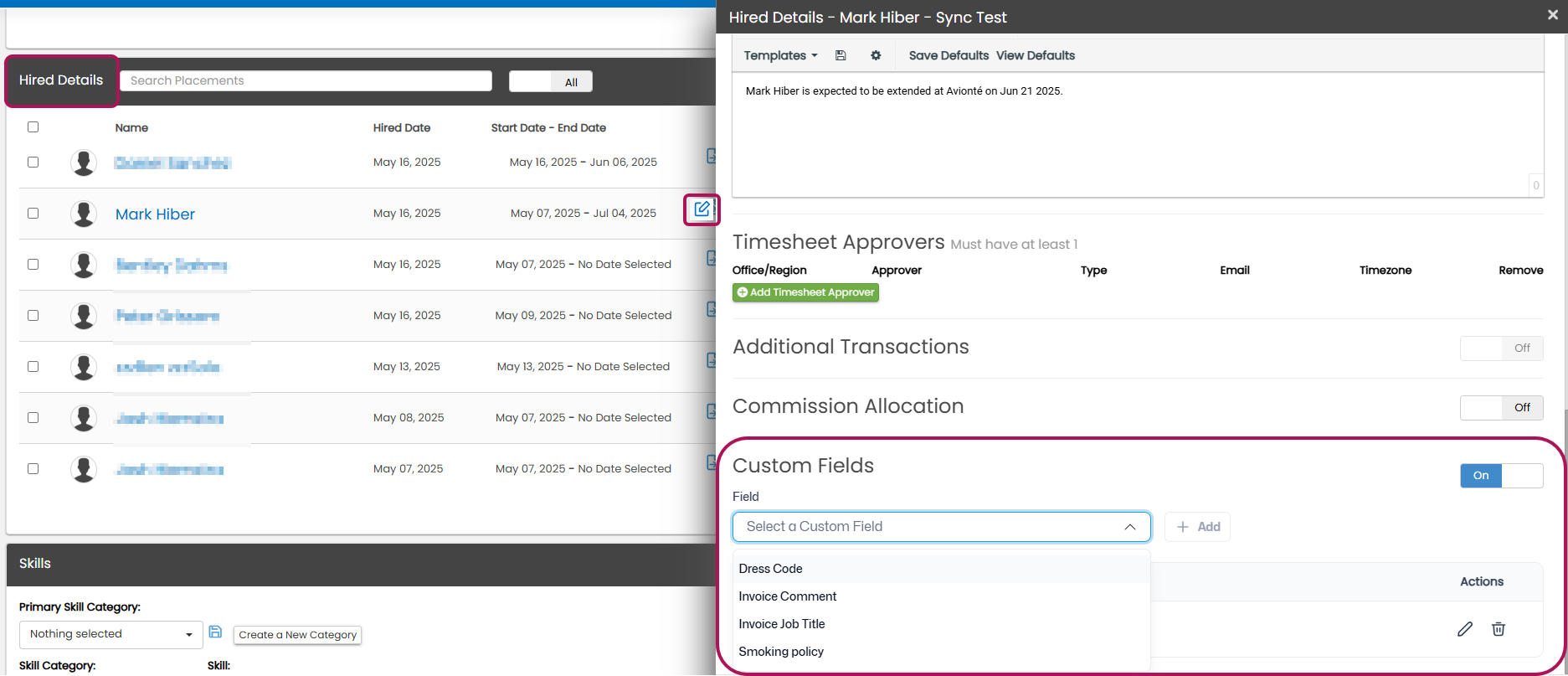
Integrated Back Office customers can now view, add, update, and remove Custom Fields (called “Extras” in Back Office) directly in AviontéBOLD.
You know this situation. You’re in the middle of updating a placement record, only to realize you need to flip over to a completely different system to check or edit a critical data field.
Having to do this once? Annoying. Having to do it dozens of times a day becomes a productivity drain. The frustration is real — and it adds up fast!
Those constant back-and-forth breaks focus, increases the chance that something gets missed, and costs your team time they could spend on more important tasks.
Being able to truly optimize operations starts with connected data, but most staffing platforms don’t deliver it. That’s exactly what Avionté set out to fix.
Avionté does, with one platform and a unified data foundation across the entire hiring journey. From day one, our focus has been clear: unite front- and back-office into a single, connected platform that drives real operational efficiency — and we’re continuing to raise the bar.
More Connected Than Ever: Custom Fields Now Editable in BOLD for Back-Office Integrated Customers
For those customers who have Avionté’s back- and front-office integration, we’ve taken another step forward in that mission by making Custom Fields (known as “Extras” in Back Office) fully accessible and editable directly inside AviontéBOLD, our front-office system, across five record types in BOLD:Talent, Company, Company Office, Job, and Placement.
For back-office-integrated customers who can access this change, the Custom Fields tab replaces the Tags tab in Talent and Company profiles, bringing more structure and visibility to the data that matters.
That means your team no longer needs to leave BOLD to view, update, or manage the custom field data that drives your reporting and billing processes. Whether it’s a Talent profile, a Company record, a Job, or a Placement, that information is now right where your recruiters and sales teams already work.
New field types still need to be created using Back Office Admin Tools, but managing those fields on individual records can now be done right in BOLD.
What This Unlocks for Your Team
You can now:
- See all configured custom fields and their current values in one place
- Add fields based on your home office configuration
- Update values as business needs change
- Remove fields that no longer apply
- Track every change with audit trails in both BOLD and Back Office
No extra steps. No extra systems.
Less Switching = More Doing
Recruiters and back-office teams shouldn’t waste time switching between systems to complete basic tasks.
This update removes a friction point that’s been hiding in plain sight and replaces it with something better: a workflow that keeps everything in one place, so your team can stay focused on what actually moves the business forward.
Ready to get started?
Visit our Knowledge Base or join the Community Forum to ask questions and connect with other Avionté users.