At a Glance
Not all staffing apps are built the same and simply giving talent an app doesn’t guarantee engagement. The right mobile experience, combined with the right agency processes, can make it easier for talent to onboard, communicate, manage assignments, access information, and stay connected between jobs.
Your agency invested in a mobile staffing app. Talent downloaded it. Maybe adoption looked strong at first.
But a few months later, some workers stopped opening it. Job alerts go unread. Messages go unanswered. And the connection that seemed promising at launch starts to fade.
It’s easy to look at that and conclude that staffing apps don’t work, but that’s not necessarily the case.
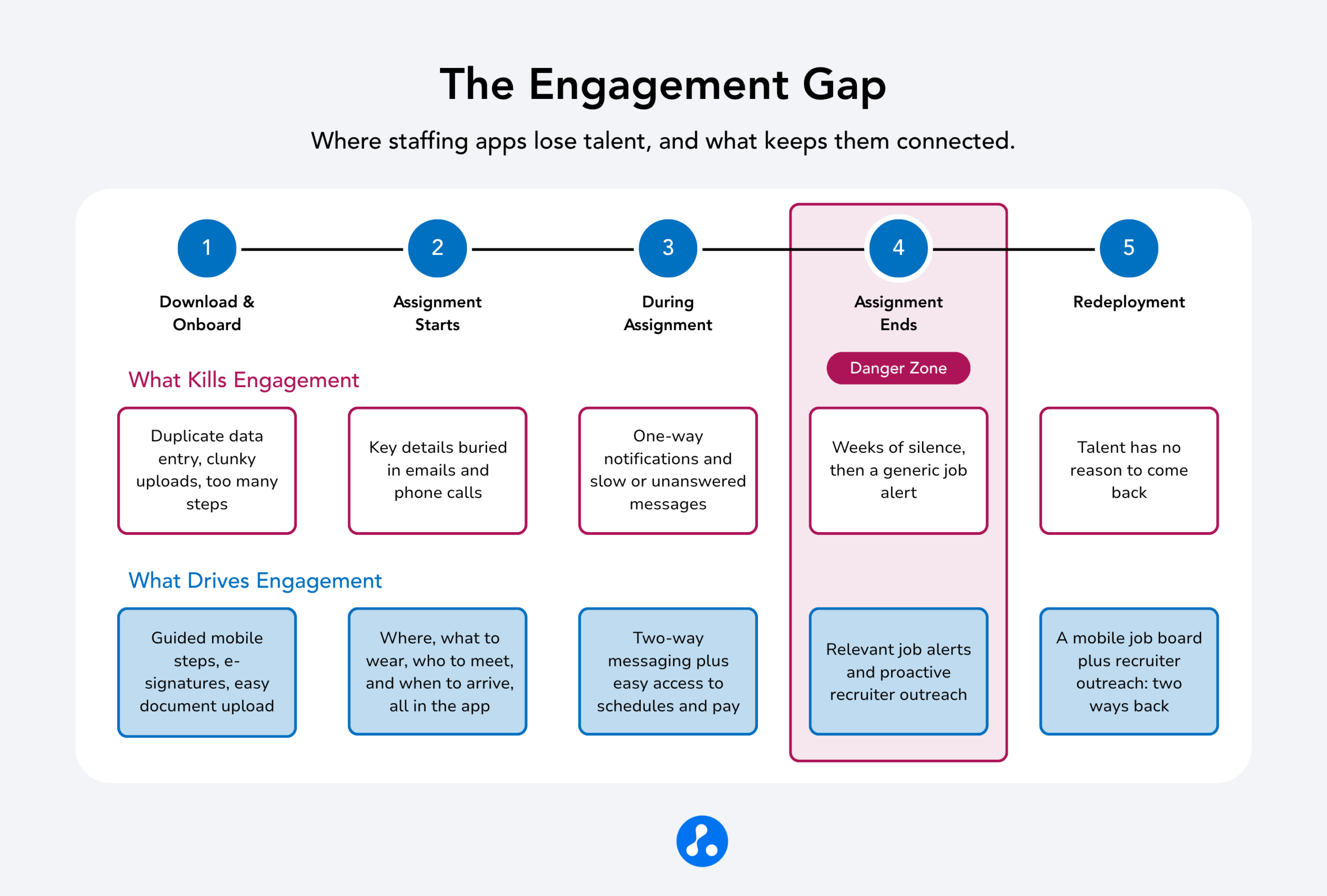
A staffing app is an engagement tool, and like any tool, its success depends on its intended purpose and how an agency uses it. An app that creates friction during onboarding, relies on one-way notifications, makes everyday tasks difficult, or goes quiet between assignments can quickly lose relevance. An app designed around how talent actually works, supported by recruiters who actively use it to communicate and keep workers connected, can do the opposite.
The difference isn’t simply whether talent downloads the app. It’s whether the app gives them a reason to keep opening it.
To keep talent engaged, four areas matter most: onboarding, communication, mobile usability, and engagement between assignments. When these elements work together, a staffing app can become much more than another channel for job alerts. It can become an always-on connection between your agency and its talent.
Is Your Staffing App Making Onboarding Easier or Harder?
The first experience a candidate has with a staffing app starts with getting into it. Downloading, signing in, and accessing the app should be simple and friction-free. If talent struggles just to get started, you’ve created a barrier before they’ve had a chance to see the value the app can provide.
If onboarding means re-entering information they’ve already provided, uploading documents through a clunky mobile interface, or waiting for a recruiter to manually approve every step, candidates quickly learn the app adds work instead of removing it.
Completing onboarding on a phone is meant to make the process easier. Talent can complete required documents from wherever they are, whether at home, on a break, or between assignments, without needing to find a computer or make a trip to the office. But that convenience disappears if the mobile interface is hard to navigate or requires too many steps. The technology may be mobile, but that doesn’t automatically make the experience better.
The same principle applies once a worker is ready to start an assignment. A staffing app can deliver key job details directly to their phone, including where to go, what to wear, who to meet, when to arrive, and other information needed to feel prepared for their first day. Rather than searching through emails, calling the office, or trying to remember details from a recruiter conversation, talent can access the information whenever and wherever they need it.
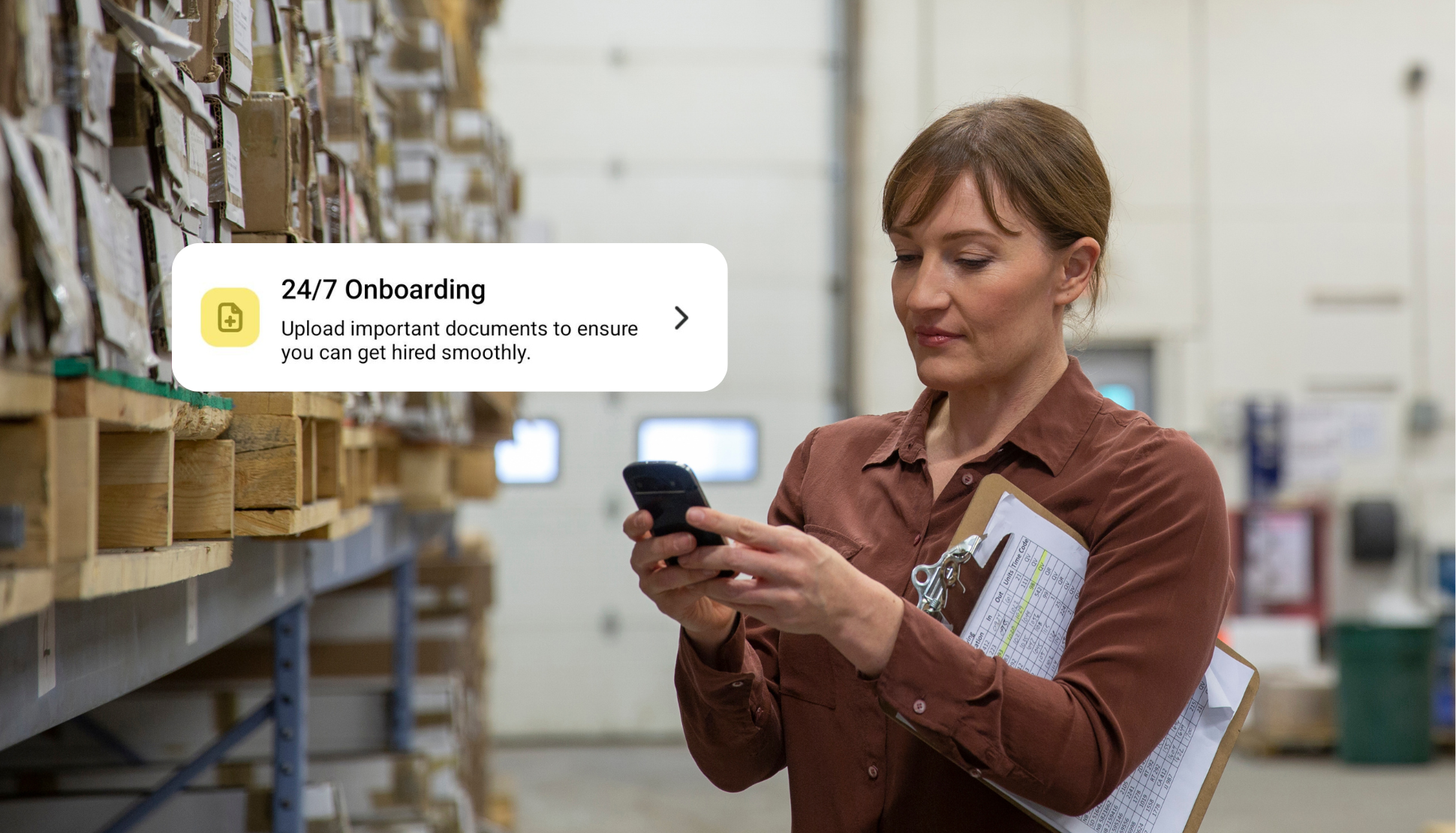
The right app can make onboarding feel like a natural continuation of the application process. Guided, mobile-friendly steps for forms, e-signatures, document submission, and other requirements can help talent complete what they need to do without unnecessary friction.
The goal isn’t simply to get someone through onboarding. It’s to establish from the start that your mobile experience makes working with your agency easier.
When onboarding and assignment information are easy to access on a phone, candidates can arrive prepared for day one with greater confidence in the process. That positive first experience gives them a reason to keep using the app as their relationship with your agency continues.
Does Your App Create a Conversation, or Just Send Notifications?
An app that only sends notifications, shift reminders, and job alerts without giving talent a way to respond can feel more like a broadcast channel than a relationship.
Two-way communication changes that dynamic.
When talent can message a recruiter directly through the app and expect a timely response, the app becomes a place where the relationship develops, not simply a place where notifications appear.
But this is where technology and agency processes must work together. Two-way messaging only builds trust when recruiters actually respond. A well-designed messaging feature that goes unanswered for two days can create more frustration than having no messaging feature at all because it creates an expectation of responsiveness and then fails to meet it.
The same principle applies to job alerts. An automated alert is useful only if the opportunity is relevant. That requires accurate candidate information, up-to-date job requirements, and recruiters who actively maintain those connections.
The best staffing apps don’t replace the recruiter relationship. They give recruiters a better way to sustain it.
Is the Mobile Experience Built Around How Talent Actually Works?
For many staffing workers, the smartphone is the most convenient way to interact with their agency. Checking a schedule, confirming a shift, finding pay information, completing a form, or looking for the next opportunity can all be done on the phone.
That makes usability more than a nice-to-have.
If an app is slow, requires too many taps to complete a basic task, or makes important information hard to find, talent may not complain. They may simply stop using it.
That’s what makes mobile usability problems particularly difficult to spot. Unlike a worker who calls to report that something is broken, a disengaged worker may simply move on to another way to get information or interact with an agency.
The most important question isn’t whether an app has a long list of features. It’s whether it makes the things talent does most often easier to do.
Checking a schedule shouldn’t be complicated. Accessing pay information shouldn’t require navigating multiple screens. Responding to a message or completing an important task shouldn’t feel like work in itself.
A staffing app that fits naturally into how talent manages work is much more likely to become part of their routine.
What Happens When an Assignment Ends?
The highest-risk moment for talent engagement isn’t necessarily during an assignment. It can be the gap between the end of one assignment and the start of the next.
During an assignment, there’s a natural reason for workers to interact with their agency. They may check their schedule, receive communications, access pay information, or receive updates about their placement.
Then the assignment ends. But when the app goes quiet, the relationship can go quiet with it.
Consistent engagement during that gap can help turn a single placement into an ongoing relationship. Relevant job alerts, continued access to key information, and proactive communication give workers a reason to stay connected even when they’re between assignments.
Consider the gap from the worker’s perspective. Their most recent interaction with your agency may have been a paycheck. If the next thing they hear is two or three weeks of silence, followed by a generic job alert that doesn’t match what they’re looking for, the relationship can quickly go cold.
But if the app continues to surface relevant opportunities and make it easy to communicate with the agency, your firm remains top of mind.
That’s where a staffing app can serve as a powerful redeployment tool rather than merely a digital version of existing processes.
Why Do Engagement Challenges Show Up So Clearly in High-Volume Staffing?
These engagement challenges aren’t unique to staffing, but they can become especially visible in light-industrial and high-volume staffing.
Assignments are often shorter, turnover between placements is higher, and more candidates may be moving through onboarding and assignments simultaneously. That means even a small amount of friction can be repeated across hundreds of workers.
A cumbersome onboarding process that frustrates one candidate is problematic. The same process repeated across a high-volume workforce can become a significant operational problem.
The same is true of engagement.
When workers frequently move between assignments, agencies have more opportunities to strengthen the relationship, but also more opportunities to lose it. A mobile experience that keeps communication, information, and opportunities accessible throughout that cycle can help agencies stay connected at scale.
In other words, the same conditions that make engagement challenging can also make the right mobile strategy particularly valuable.
How Do You Know Whether Your App Is Actually Engaging Talent?
Before assuming your app isn’t working, look at the data.
Download counts and initial adoption can tell you whether talent is willing to try the app. They don’t indicate whether the app has become part of the ongoing relationship.
Three areas can provide a more useful picture.
-
Look at completion and drop-off rates.
Track how many talent users complete key steps in the app and where they drop off. A significant drop-off at a particular step can indicate that users are getting stuck, frustrated, or missing the information they need to move forward. Look for patterns across onboarding, document submissions, or other key actions to identify where the mobile experience may be creating friction.
-
Look at in-app communication.
If workers are using the messaging function but aren’t receiving timely responses, the issue may not be the app at all. It may be the process behind it. Technology can enable two-way communication, but your team has to participate.
-
Look at the gap between assignments.
How long does it typically take for a worker to move from one assignment to the next? Are workers receiving relevant opportunities during that window? If engagement drops sharply after an assignment ends, that’s a signal to examine what happens during that period.
The goal isn’t to find a single app engagement metric that tells you whether you’re succeeding. It’s to understand where the relationship is weakening and whether the cause is the technology, the process, or both.
What Does a Successful Staffing App Strategy Look Like?
Trying to fix every potential engagement issue at once usually isn’t necessary. Start with the area where your data shows the greatest opportunity.
If onboarding is the problem, map every step talent must complete and identify opportunities to eliminate duplicate data entry, simplify mobile tasks, and make the process more intuitive.
If communication is the problem, set clear expectations for responding to in-app messages. Two-way communication needs to be treated as part of the recruiting process, not as another inbox that can go unanswered.
If engagement drops between assignments, give talent multiple ways to stay connected. Proactive communication from recruiters can help keep talent engaged, but it shouldn’t be the only path back to your agency.
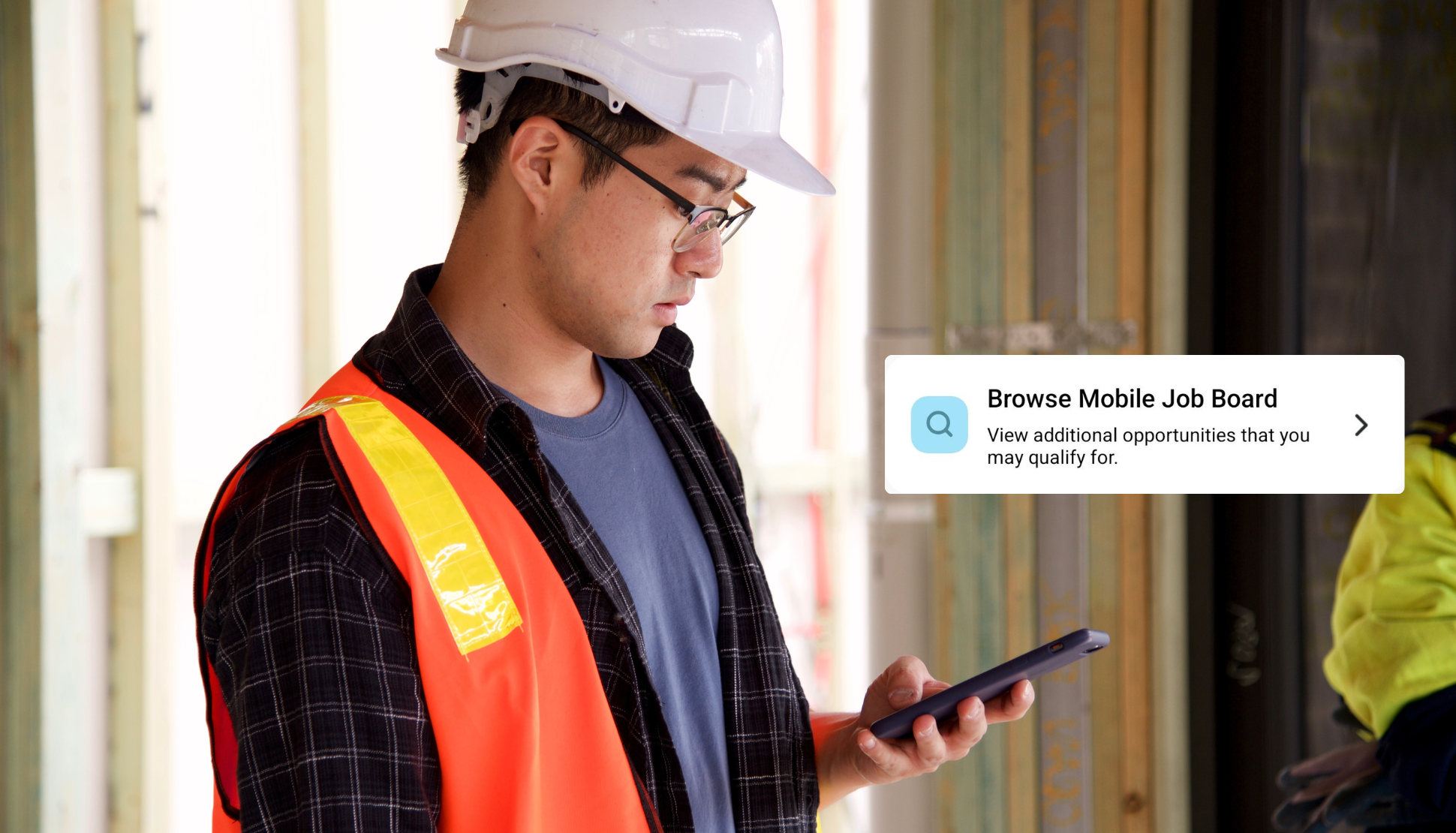
A strong staffing app should also support talent-led engagement through features like a mobile job board, where workers can browse available opportunities, search for their next assignment, and act when they’re ready. The goal is to create multiple opportunities for engagement. Whether the agency reaches out with a relevant opportunity or talent actively returns to your job board to find one.
Finally, throughout all of it, make sure the app is doing something valuable for talent.
The goal isn’t to get workers to open the app because you’ve told them to. It’s to create an experience that gives them a reason to open it.
What Role Does Recruiter Behavior Play in App Success?
It’s tempting to think of an app as something that should solve engagement on its own.
It can’t.
Even the best mobile experience needs an agency operating behind it.
Two-way messaging builds trust only when recruiters respond promptly. Job alerts create value only when candidate profiles and job requirements are accurate. Continued engagement happens only when someone is thinking about what talent needs between assignments.
Technology can remove friction and automate parts of the process, but it can’t replace the human relationship that keeps talent wanting to keep working with your agency.
That’s why the most successful staffing app strategies combine the right technology with the right habits and processes.
The app becomes the channel. The agency provides the relationship.
How Long Does It Take to Rebuild Engagement?
If talent has already disengaged, fixing the underlying problem doesn’t necessarily bring them back overnight.
A worker who stopped using an app several months ago due to a poor onboarding experience may have no reason to learn that the experience has improved. Re-engagement may require a direct call, text, or targeted campaign that gives them a reason to return.
That means agencies should view engagement as an ongoing process rather than a one-time technology implementation.
The objective is to build the right experience from the start, monitor how talent uses it, identify where engagement is weakening, and make changes before disengagement becomes a larger redeployment problem.
What Should You Track After Making a Change?
Once you’ve identified an engagement gap and made a change, focus on the metrics most closely tied to that specific issue.
After an onboarding improvement, track onboarding-flow completion rates over the following weeks. This can provide an early indication of whether the new experience is reducing friction.
After improving communication, look at how talent uses the app to stay connected with your team. A strong staffing app should make it easy for talent and recruiters to reach each other and provide visibility into that activity. Review messaging volume, how conversations take place, and whether talent has a clear, accessible way to reach your team when they need help or have a question.
After improving between-assignment engagement, track how many workers receive relevant job opportunities shortly after an assignment ends. This can provide an early signal of whether your outreach strategy is helping keep talent connected before redeployment outcomes become visible.
The key is to measure behavior that links the app to the business outcome you’re trying to improve.
Built to Keep Talent Engaged, Not Just Enrolled
The right staffing app should do more than onboard talent or send the occasional job alert. It should make it easier for talent to get started, stay informed, connect with your team, manage their work, and find their next opportunity throughout the talent relationship.
Avionté Mobile (formerly Avionté 24/7), Avionté’s comprehensive mobile app, is designed to support that ongoing connection. Talent can easily access the app, complete guided onboarding and upload required documents from their phone, access important assignment information, communicate directly with their agency, view pay and job opportunities, and stay connected between assignments. Agencies using Avionté Mobile see redeployment rates 2 to 3 times higher than those relying on manual outreach alone.
So don’t judge a staffing app by how many people download it. Judge it by what happens after they download it. Do they keep using it? Can they easily get the information they need? Can they reach your team when they have a question? Can they see and choose their next opportunity? And, most importantly, do they come back when their assignment ends?
Because the real value of a staffing app isn’t getting talent onto your platform. It’s giving them a reason to stay connected to your agency. When the app makes it easier to work with you, find their next opportunity, and stay engaged between assignments, you’re not just managing talent. You’re creating the next opportunity to place them.
Key Takeaways
- Start Early for Stress-Free Year-End Tax Prep – Treat October as the real start of year-end. Early payroll audits, compliance reviews, and system updates help staffing agencies prevent January tax-season chaos and ensure accurate W-2 and ACA filings.
- Test and Validate Payroll Data to Reduce Risk – Run trial W-2 and ACA reports before year-end to identify and correct errors early. Proactive testing minimizes filing rejections, tax penalties, and compliance headaches for staffing firms.
- Use Staffing-Specific Payroll Technology – A unified staffing platform like Avionté, integrated with Greenshades, automates complex multi-state payroll filings and delivers year-end tax accuracy, compliance confidence, and audit readiness.